Who we are
ohelloo is ohelloo LLC, a Missouri company run by Omar Yusuf (our postal address is on our terms). We set up websites, Google listings and software for small businesses. On this page “we” and “us” mean ohelloo LLC, and “you” means you or your business. Questions about your details go to omar@ohelloo.com.
What we collect
- The “Say hello” form: your name and phone or email, and anything else you add: your business, a message, a package and what you need help with. It also notes which page you sent it from.
- Shop checkout: your name, phone or email, your business if you add it, any note, what’s in your cart, and the guide you picked. When you pay, Stripe gives us your email and phone number so we can reach you. If you start paying but don’t finish, we keep the order so we can follow up, and we may send you one reminder that your cart is saved.
- Your setup page and dashboard (the private link we send clients): the answers you give about your business, the files you upload (like your logo, photos, menus or a customer list), which steps you’ve done, and any questions you ask there. Once it’s your dashboard, you sign in with a code texted to your mobile or a link emailed to you, so we keep which number or email can sign in. Each time your project page is opened we note when, which name was picked, whether it was a phone or a computer (with a random tag your browser keeps, so we can tell two phones apart) and your device’s internet address, plus which parts of the page you open and tap (like the phone view, your brand questions, Pay or Book a call).
- ohelloo Work (the jobs app for your team): so we know which parts get used, we count which screens your team opens and which buttons they use each day (like “opened New quote” or “tapped On my way”), with each person’s role (owner, office or tech). Never your customers’ details, amounts or anything typed. We also keep what you send us with “Something missing?” in the app, and your replies to our monthly check-in text.
- Chatting with elloo (the assistant in the search bar on ohelloo.com): what you type, what elloo shows and answers, the buttons you tap, the answers you give (like how many orders you get a week and a typical order) and your business name if you give it, kept with a random number for the chat rather than your name. We read these chats to follow up and to make elloo better, and Claude scores how each one went. If you leave your email or mobile number in the chat, it reaches Omar like the “Say hello” form.
- How you found us: when you send us a message, order, sign up or leave your details with elloo, we keep how you found us: the website or search that sent you (like Google), any campaign tag on the link, the first page you saw and the day, and your answer to “How did you hear about us?” if you give one. So that a second visit doesn’t hide the first, your browser remembers how you first arrived for 90 days; it reaches us only with one of those, never on its own.
- ohelloo Work founder applications: your name, cell, email if you add it, your business and trade, your team size, what you use now and what it costs, your biggest headache with it, and whether we may text you. We keep what you type as you go, once there is a cell or an email in it, so Omar can get back to you even if you don’t press Send. We use it only to talk to you about ohelloo Work.
- Calculator results by email: when you ask us to email your missed call calculator results, your first name, your email, the numbers you typed in and the answer above. We email it once, Omar may follow up once to see if you have questions, and we don’t add you to a mailing list.
- Accounts you connect: see Connecting your Google or Facebook account and Connecting QuickBooks below.
- Home Kitchen orders: your name, phone or email, any notes and your order, so the baker can make it and hand it over.
- How our pages are used: Google Analytics counts visits to ohelloo.com, which pages people look at and where they came from, and what they do there (tapping a call or email link, looking at prices, starting a sign-up, playing a video, how far they read a guide, using the calculator, sending a form), using a cookie. On the shop and Home Kitchen order pages we also note each checkout step (looked, added to cart, started checkout, paid) with a random number for the visit, never your name, so we can see where checkout goes wrong and fix it. Microsoft Clarity shows us how the pages are used: where people click and scroll, and recordings of visits with everything you type hidden, and your chats with elloo hidden too. It uses a cookie. You can block Google Analytics and Clarity with your browser’s settings or an ad blocker, and the pages still work the same.
- Emails from Omar: when we email a business about our services, the email carries a tiny see-through picture. When your mail app shows it, we see that the email was opened, when, and which mail app opened it (like Gmail). If your mail app doesn’t load pictures, we don’t see it. The links to ohelloo.com in those emails carry a code for that email, so if you click one we see which pages of ohelloo.com you looked at and when, kept in your browser for 30 days. Many company mail filters open every link in new mail by themselves, so to tell you apart from one, the page also notes how long it was open, how far it was scrolled and how many taps it got, and your device’s time zone, language, screen size and graphics chip. We also look up which company runs the internet connection it came from (like Comcast or Microsoft) and keep only that company’s name, not your internet address. Clicks on other links in those emails pass through ohelloo.com so we can count them. We use all of this only to know when to follow up.
Your customers’ details. When your customers call or text the number we set up for you, we handle their details for you, not for ourselves: their phone number, their messages, and for calls your AI voice assistant answers, a recording, a transcript and a summary (it tells callers the call may be recorded). When we catch the contact form on your own website for you, it’s the name, phone, email and message they type into it, saved as they type (a line under the form says so), and never any other box. We act only on your instructions, as your service provider: we use them only to run your service and show you how it’s going, and we never contact your customers for anything else, sell their details or use them for advertising. Call recordings and transcripts are deleted after 12 months, and the rest when you leave (see how long we keep it).
How we use it
Only to do the work you asked for: to reply to you, take your order, set up and run your website, listing and software, and send you messages about your setup, like your setup link and a reminder if you haven’t finished. We don’t use your details for advertising, we don’t build profiles about you, and we never sell your details.
Texts from ohelloo
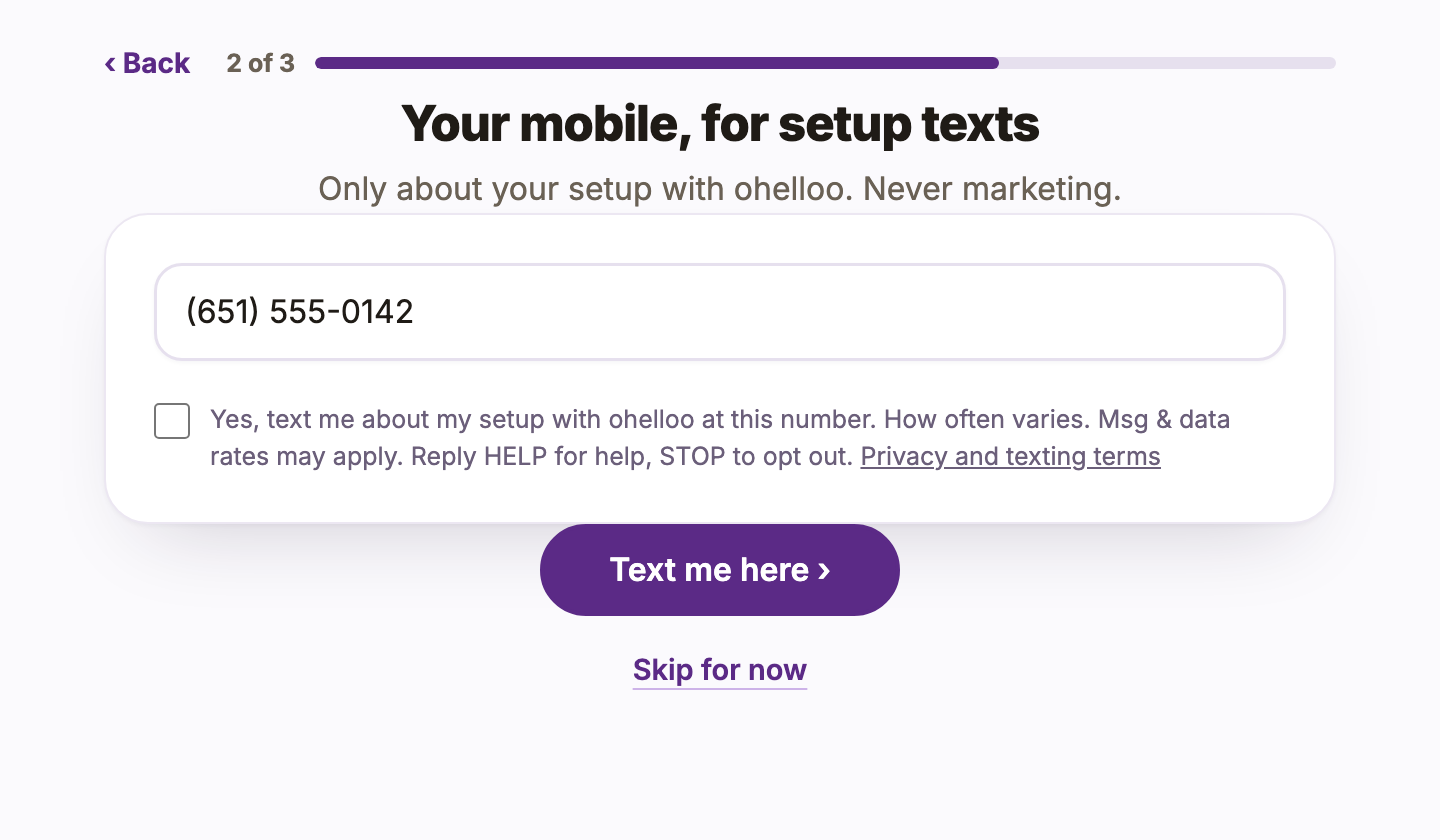
We text from our number, (833) 631-7142, only about your setup and your service with ohelloo: your setup link, quick questions while we build, when something goes live, answers to your questions, and a reminder if a step is waiting on you. We never send marketing texts.
- How you agree: you give us your mobile on your setup page and tick the box that says “Yes, text me about my setup with ohelloo” (it’s never ticked for you), or you text us first. Texts aren’t a condition of buying anything.
- How often: it varies, usually a few texts a week while we set you up, and fewer after.
- Message and data rates may apply.
- Stopping: reply STOP at any time and we won’t text you again (reply START to turn texts back on). Reply HELP for help, or email omar@ohelloo.com.
- Phone carriers aren’t responsible for texts that are delayed or don’t arrive.
Order texts for bakeries on ohelloo
When you order from a bakery’s ohelloo order page and give a mobile number, you get texts about that order. They come from the bakery’s own number, or, for bakeries on ohelloo’s free plan, from ohelloo’s order-texts number. Each text from ohelloo’s number starts “ohelloo:”, names the bakery, and uses ohelloo’s own wording.
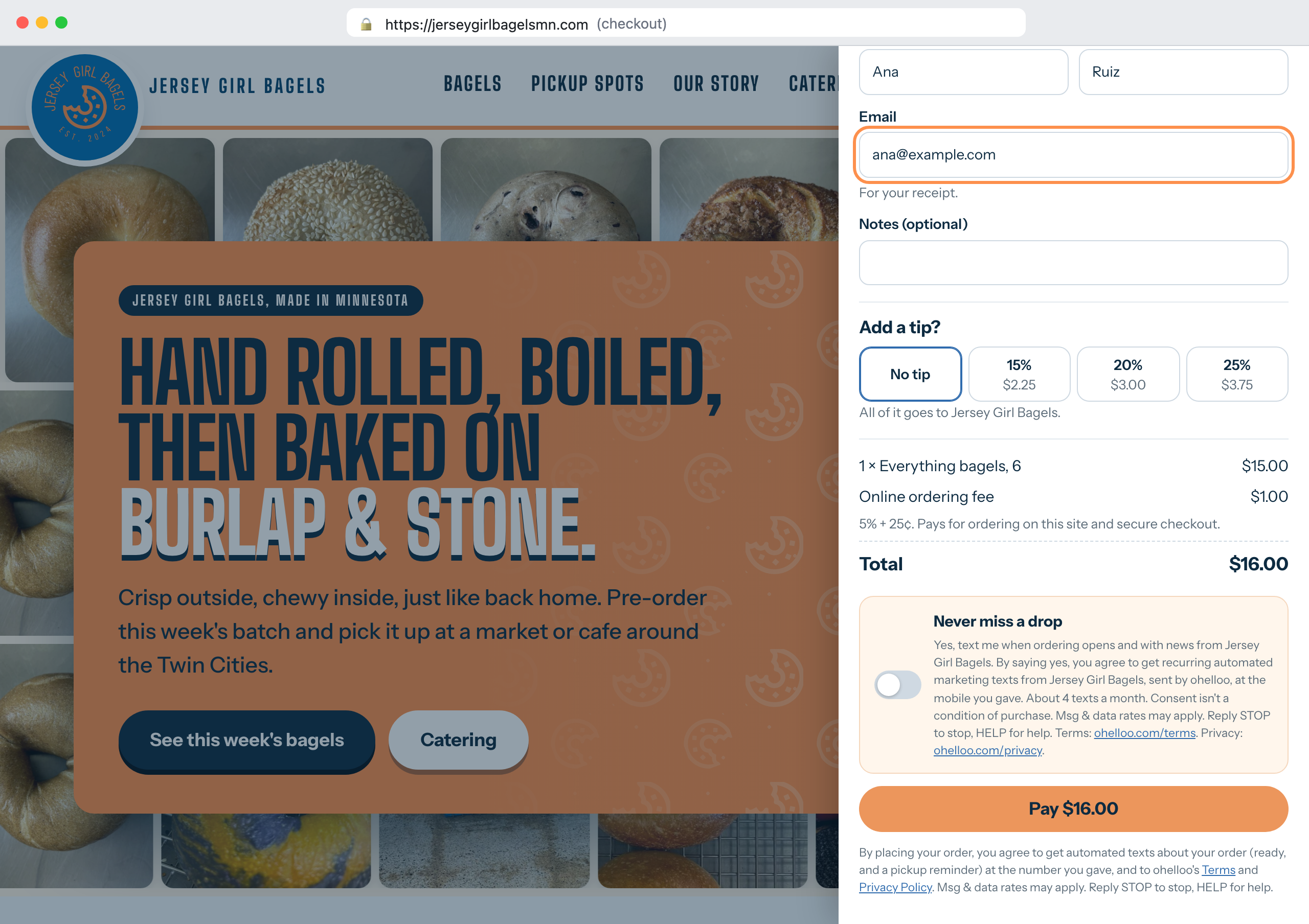
- How you agree: at checkout, the page says that a mobile you give gets texts about your order: under the phone box (“Give a mobile and we’ll text it when your order is ready, with a pickup reminder”), or on a bakery’s own website in the small print under the Pay button (“By placing your order, you agree to get automated texts about your order at the number you gave”). Giving a mobile for your order is your yes to texts about that order. You can give an email instead, and texts aren’t needed to order.
- What and how often: only about your order: when it’s ready and a reminder before pickup, usually one or two texts an order. No offers or marketing.
- Message and data rates may apply.
- Stopping: reply STOP at any time. STOP to ohelloo’s order-texts number stops order texts from every bakery that uses it; reply START to turn them back on. Reply HELP for help, or email hello@ohelloo.com.
- Replies go to the bakery you ordered from, in its ohelloo inbox.
Drop and news texts from bakeries
Separately, you can ask a bakery to text you when ordering opens and with its news. These are marketing texts, so they only come if you say yes.
- How you agree: you tick the box that says “Yes, text me when ordering opens and with news from” the bakery (at checkout or in its “Never miss a drop” sign-up), or turn on the “Never miss a drop” switch above the Pay button. The words beside it say you agree to get recurring automated marketing texts from that bakery, sent by ohelloo, at the mobile you gave. It’s never on for you, and consent isn’t a condition of purchase.
- How often: about 4 texts a month.
- Message and data rates may apply.
- Stopping: reply STOP at any time to stop every text from that number, or UNSUB to leave just that bakery’s list. Reply HELP for help.
We do not sell, rent or share your mobile number or texting consent with anyone else for their marketing. Mobile information is never shared with third parties or affiliates for marketing or promotional purposes. Twilio, which delivers our texts, gets your number only to deliver them.
Connecting your Google or Facebook account
On your setup page you can connect your Google or Facebook account with one click instead of following steps by hand. Here’s exactly what happens:
- You sign in on Google’s or Facebook’s own page. We never see or keep your password.
- Google: we use the permission you give to add ohelloo as a manager of your Google Business Profile, to share your calendar with ohelloo so bookings can go onto it, and to list your profiles and calendars so you can choose which ones.
- Facebook and Instagram: we use the permission you give to list your Facebook Pages and connected Instagram accounts, and to give ohelloo’s business account partner access to the ones you choose.
- Your account stays yours. You stay the owner, and you can remove ohelloo at any time in Google Business Profile, Google Calendar settings, or Facebook’s Business settings.
- We don’t keep the sign-in. Google and Facebook give us a temporary key to do the steps above. We use it straight away and don’t store it. What we keep is a note of what was connected and when.
Google user data. ohelloo’s use and transfer to any other app of information received from Google APIs will adhere to the Google API Services User Data Policy, including the Limited Use requirements. We use Google user data only to set up the access described above for you. We don’t sell it, use it for advertising, or let people read it except where you’ve asked us to help, for security, or where the law requires. We don’t use it to train AI models.
The ohelloo Work app
ohelloo Work is the app your team uses for jobs, appointments and orders, on iPhone and on the web. Here’s what it uses on your phone, and why. It asks before each one, and you can say no or change your mind in your phone’s Settings.
- Signing in: the mobile number (or Google email on the web) your business added you with. We text you a code. There’s no password.
- Location: while the app is open, to show where you are on the map. If you go to your customers, from when you tap On my way until you tap Start, so your customer sees about how many minutes away you are, even with the app in the background. It isn’t kept on the job once you arrive, and it’s never used to track you at other times.
- Camera and photos: only the photos you take or pick for a job, an order or a receipt.
- Microphone and speech: for Talk it through, which turns what you say into written notes. Your phone’s speech service turns it into words, and we keep only the words, never a recording.
- Notifications: a code from your phone so we can tell you about new bookings, messages and payments.
- Tap to Pay and card readers: card details are read by Stripe and never reach ohelloo. Bluetooth and your Wi-Fi are used only to connect a Stripe card reader, if you use one.
- Crash reports: if the app breaks, Sentry gets a report of what broke, with your business and your role, never your customers’ details.
- Reporting a problem: when you send us a problem or an idea from Feedback or Get help, it can include a picture of your screen and what the app was doing (the screens, the buttons you tapped, errors, your device and the app’s version), never anything you typed into Work. You see it all before it goes, and you can hide parts of the picture or leave it out. Card numbers and passwords are hidden in it. On the web, Sentry also keeps a short replay of the minute before (where you tapped and what changed on the screen, with every word and picture blanked out), and sends it only when something breaks or you send a report. Only ohelloo sees it, and Claude reads it to help us sort and fix the problem.
What you put in (your customers, jobs, quotes, invoices, photos and notes) belongs to your business, and we handle it for you as described under your customers’ details. The app has no ads and no tracking, and we never sell anything in it.
Deleting your account: in the app, go to Settings (or You), then Delete my account. If you’re on someone’s team, you’re taken off it and your sign-in is deleted straight away. The jobs you worked on stay with the business. If you’re the owner, it deletes your business and everything in it: we check with you first, then delete it within 30 days and tell you when it’s done.
Connecting QuickBooks
If your business uses QuickBooks Online, ohelloo Work can copy your invoices and payments into it for you. The owner connects it in Work, under Settings, then QuickBooks. Here’s exactly what happens:
- You sign in on Intuit’s own page. Intuit makes QuickBooks. We never see or keep your QuickBooks password.
- One permission: QuickBooks accounting. We don’t ask for QuickBooks Payments, QuickBooks Payroll or your Intuit profile.
- What we read: your company’s name, your list of accounts (so things go in the right place, and so you can pick the bank account Stripe pays into), your customers, products and services and payment methods (so we use the ones you already have instead of making copies), and the invoices, payments, entries and transfers that match what we’re about to add (so nothing goes in twice). We don’t read your bank feeds, reports or payroll.
- What we add: the customers, invoices and payments from Work. When you void an invoice in Work, we void it in QuickBooks. When a payment is refunded in Work, we take our copy of it back out. That’s the only thing we ever remove, and only one we put there.
- If you turn on Stripe payouts: we add two accounts, “Stripe (ohelloo Work)” and “Card processing fees (ohelloo Work)”. Then each day we add one entry for that day’s card sales, refunds and fees, and a transfer to your bank for each payout.
- We keep the sign-in key. Copying happens every day, so we keep the key Intuit gives us and your QuickBooks company number. They’re stored with Google Cloud, encrypted, and only ohelloo’s own servers can read them. Your team can’t see them in Work.
- Your books stay yours. What we copy stays in your QuickBooks if you disconnect. We never sell your QuickBooks data, use it for advertising, or use it to train AI.
- Stopping: untick “Copy invoices and payments into QuickBooks” in Work and copying stops. To disconnect completely, tap Disconnect QuickBooks in Work, or remove ohelloo from the connected apps in QuickBooks. Disconnecting in Work deletes the key straight away. If you remove us in QuickBooks instead, the key stops working, and you can email omar@ohelloo.com to have it deleted within 30 days. We also delete it when you leave ohelloo.
Who we share it with
We don’t share your details with anyone except the services that help us do the work, and only what each one needs:
- Google Firebase and Google Cloud (in the US): where our lead manager, your setup page and your files are stored.
- Stripe: payments. We never see your card number.
- Anthropic (Claude): when you chat with elloo on ohelloo.com, ask us to read your website, or ask a question on your setup page, or send us a problem report from ohelloo Work, what you type, the page text or the report is sent to Claude to write the answer or sort it, and elloo chats are sent again for Claude to score how they went. Anthropic doesn’t use it to train its models.
- Twilio: text messages and phone numbers: messages about your setup, and the texts and calls on the number we set up for your business.
- Retell AI: runs the AI voice assistant: it answers your calls, and records and writes down each call so you can see what was said.
- Google (Firebase Authentication): sends the sign-in codes and links for your dashboard.
- Google Workspace (Gmail): to send you emails.
- Google Maps: the address and business search on your setup page, and your Google rating and review count for your dashboard.
- Google Analytics: visit counts, the taps and checkout steps above, with no names, emails or phone numbers.
- Microsoft Clarity: where people click and scroll on our pages, and recordings of visits, with what you type and your elloo chats hidden, and no names, emails or phone numbers.
- Finch: when you connect your payroll app, Finch reads your company name, staff list, jobs, pay runs and pay stubs for us. Never Social Security numbers or birthdays.
- Intuit (QuickBooks): when you connect QuickBooks, the customers, invoices and payments we copy for you go into your own QuickBooks company.
- Composio: when you connect an app in one tap through it, Composio keeps that app's sign-in key for us. We keep only a reference to it.
- Team Cymru: when a page is opened from a link in one of our emails, we ask their free lookup which company runs that internet address. They see the address, we keep only the company’s name.
- Sentry: if one of our pages breaks, a report of what broke (the page, the browser, the error and your device’s internet address, which Sentry uses to tell roughly what town it came from), never what you typed.
- PostHog: how people use our pages (which pages and buttons), without cookies and with no names, emails or phone numbers. Screen recordings are off on ohelloo.com. On a client’s private project page, PostHog records how the page is used (where you tap and scroll) so we can make it easier, with everything you type hidden.
We’d also share details if the law requires it.
How long we keep it
Call recordings and transcripts for 12 months. Everything else for as long as we’re working together, and up to 3 years after, so we can answer questions about past work and keep tax records. Orders and leads we never hear back from are deleted within 2 years. Chats with elloo are deleted after 90 days unless you left your details in them. You can ask us to delete your details sooner at any time.
Deleting your details
Email omar@ohelloo.com with “Delete my details” and the name or email you used. We’ll delete them within 30 days and email you when it’s done. Payment records Stripe must keep by law stay with Stripe.
In the ohelloo Work app: Settings, then Delete my account (see The ohelloo Work app).
If you connected Facebook: you can remove ohelloo in Facebook under Settings, then Apps and websites, and email us to delete what we kept. If you connected Google: you can remove ohelloo at myaccount.google.com/permissions, and remove ohelloo as a manager of your Business Profile and calendar. If you connected QuickBooks: tap Disconnect QuickBooks in Work (Settings, then QuickBooks), or remove ohelloo from the connected apps in QuickBooks and email us to delete the key (see Connecting QuickBooks).
What loads on this website
There are no ad trackers. Google Analytics counts visits with a cookie, with its advertising features switched off, and Microsoft Clarity shows how pages are used, also with a cookie (see what we collect). Because we don’t follow you across other websites, your browser’s “Do Not Track” setting doesn’t change anything here. These outside services also load:
- Google Fonts, for the lettering on every page. Like any website request, Google sees your device’s internet address when the font loads.
- Google’s Firebase code, when you send the “Say hello” form or check out, on your setup page, and on Home Kitchen pages.
- An animation library (GSAP, from Cloudflare’s cdnjs) on the home page.
- Sentry’s error reporter and PostHog, described above, once they’re switched on.
The shop remembers your cart in your own browser, so it’s still there when you come back. It isn’t sent to us until you place an order.
Keeping it safe
Your details are stored with Google Cloud, which encrypts them. Only people Omar approves can read them, and they sign in with two-step verification. Your setup page is reached by a long private link, so keep it to yourself. Once it’s your dashboard, it also asks you to sign in.
If something goes wrong. If your details or your customers’ details are ever exposed, we’ll tell you promptly, as the law requires, with what happened and what we’re doing about it.
Your rights
You can ask us what we hold about you, have it corrected, or have it deleted, by emailing omar@ohelloo.com. We answer within 30 days. Laws like California’s privacy law (the CCPA) apply to businesses bigger than ohelloo is today, but we follow the same ideas anyway, and we never sell or share your details for advertising.
Children
ohelloo is for businesses. We don’t knowingly collect details from anyone under 13.
Changes and contact
If we change this page, we’ll update the date at the top, and tell clients about anything important. Questions? Email Omar at omar@ohelloo.com. Our terms cover everything else.